
An RFID LED tag is an RFID tag with a small built-in LED that lights when the tag is read, so the person holding the reader sees which physical item answered instead of one more ID in a list. This page compares seven of Identium’s light-up RFID tags and labels: UHF on-metal PCB tags, a UHF PCB tag for non-metal items, UHF and NFC cable labels, and a UHF jewellery tag, and sets out what lighting the LED depends on.
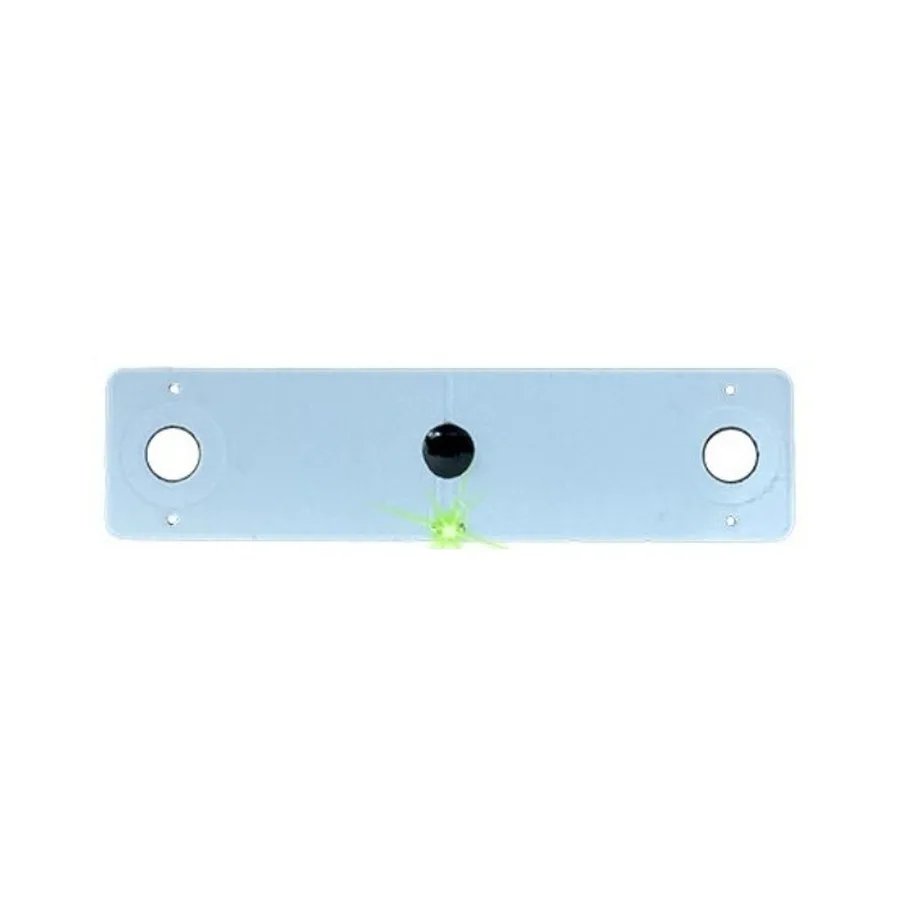
What an LED tag adds to an ordinary RFID read
A normal read tells the software that a tag ID is in the field, not which of twenty similar items on a shelf, rack or tray carries it. A tag-side LED closes that gap by lighting on the item itself.
Reader-side indicators are different. An LED on a reader, or a light driven from a reader’s GPO output, sits on the reader and says “a tag was read here”, not “this is the item”. Battery-powered BLE beacons at 2.4 GHz are a different technology again, not passive RFID.
Where the LED gets its power
None of the seven Identium LED tag listings specifies a battery, and the listings give no battery-life figures. A passive UHF tag draws its power from the reader’s field.
Find-me use depends on addressing one tag. In an EPC Gen2 (ISO/IEC 18000-63) round, a reader can first send a Select command masked on part of one tag’s EPC, so only the matching tag takes part in the inventory that follows. A search for one piece then lights one LED rather than every tag in the field. Which access actually drives the LED (a plain read, or a read of a particular memory location) is set by the chip, so ask for it for the SKU you order.
So the LED is not a property of the tag alone: whether it lights depends on the reader, its software and the set-up. The jewellery tag listing says so directly, noting that the LED needs reader and software support. The three IDTS listings describe a green LED that lights on read (the IDTS-6010-LED’s flashes). We do not quote LED visibility distances or blink timings.
Seven Identium LED tags at a glance
The 860–960 MHz figures below are the chips’ global tuning span, not a licence; see RFID frequencies for India’s licence-exempt band.
| Model | Form factor and size | Chip | Frequency and protocol | Read range as listed | Typical use |
|---|---|---|---|---|---|
| IDTS-5213-LED | On-metal PCB, 52 × 13 × 2.5 mm, two screw holes | KX2005X-BL | 860–960 MHz; EPC Gen2 / ISO/IEC 18000-63 (listed as ISO 18000-6C) | Approx. 4 m on metal (depends on reader) | Tools and panels on metal |
| IDTS-6010-LED | Narrow on-metal PCB, 60 × 10 × 2.5 mm, holes at each end | KX2005X-BL | 860–960 MHz; EPC Gen2 / ISO/IEC 18000-63 | Approx. 3 m on metal (depends on reader) | Rack rails, server chassis edges, tool holders |
| P-M7020 | On-metal FR4 PCB, 60 × 20 × 4 mm as listed, adhesive mounting | U9 / U8 | UHF (band and protocol not listed) | Listed as up to 12 m on metal, reader dependent | Pick-to-light shelving, locating items on metal |
| IDTS-7020-LED | PCB, 70 × 20 × 2 mm, non-metal surfaces only | KX2005X-BL | 860–960 MHz; EPC Gen2 / ISO/IEC 18000-63 | Approx. 6 m (depends on reader) | Non-metal items, read-zone checks |
| ID-4111-KX | UHF cable label, 41 × 11 mm antenna, 95 × 30 mm die-cut | KX2005X-BL | 860–960 MHz; EPC Class 1 Gen2 / ISO/IEC 18000-63 | Up to 6 m (depends on reader, antenna and environment) | Cables and wires in racks and trays |
| ID-7556-FM13HS01 | NFC cable label, 25 × 15 mm antenna, 75 × 56 mm die-cut | FM13HS01N | 13.56 MHz HF/NFC; NFC Forum Type 5 / ISO/IEC 15693 | Up to 0.2 m (reader-dependent) | Cables in panels, racks and trays |
| UHF LED tag for jewellery | Thin, flexible tag; size not listed | Not listed | 860–960 MHz; EPC Gen2 / ISO/IEC 18000-63 | Up to 6 m (depends on antenna and environment) | Jewellery trays and vault drawers |
On-metal PCB LED tags: IDTS-5213-LED, IDTS-6010-LED and P-M7020
All three go directly on metal. On-metal tags put a dielectric spacer and ground plane behind the antenna so the metal becomes part of the tuned structure, as RFID metal tags explains. They differ in fixing: the IDTS-5213-LED has two 4 mm screw holes 41.5 mm centre to centre, the IDTS-6010-LED has three small holes at each end, and the P-M7020 uses industrial-grade adhesive on an FR4 board with an epoxy resin surface. Confirm the P-M7020’s listed 60 × 20 × 4 mm dimensions with Identium in writing before designing a holder around it.
IDTS-7020-LED for non-metal items and read-zone checks
A blue PCB bar with a green LED, for non-metal surfaces only. Its listing suggests it for checking read zones when setting up readers: placed on non-metal items around a new antenna, it shows which positions that antenna reaches, provided your reader lights it. No mounting holes or adhesive are specified.
LED cable labels, UHF and NFC
The ID-4111-KX is a UHF label on a flexible thin substrate, and its listing gives 1312 bits of user memory; the ID-7556-FM13HS01 is an HF/NFC label listed with 1024 bits. They need different readers: Identium’s UHF readers cannot read the NFC label, and a phone’s NFC can never read the UHF label. The store’s guide on whether a phone can read UHF RFID tags compares sleds and handhelds. Neither label’s listing gives a metal-mounting rating.
Where LED tags earn their place
- Pick-to-light shelving. The P-M7020’s LED shows staff which item to pick or find, on shelving or on tools and equipment on metal.
- Cable identification. The two cable labels help a technician pick out the right cable in a crowded rack, panel or tray instead of reading a faded marker.
- Jewellery trays and vault drawers. After a reader search, the jewellery tag’s LED shows which ticket belongs to the piece staff need, so they need not lift every item. Tag styles are covered on RFID jewellery tags.
- Tool holders and rack rails. The IDTS-6010-LED and IDTS-5213-LED show which tool or panel responded. In a steel tool cabinet an over-powered antenna can read the next bay; RFID tool tracking covers cabinet and reader-power design.
For the register and software side, see RFID asset tracking.
Testing the LED with Identium readers and software
ReaderSense is free and ships with every Identium UHF reader. It can target a single tag with a filter, read any memory bank (EPC, TID or User) and set RF power by hand.
CX Flow Pro ships on the CX1500N handheld, an Android 12 terminal with a UHF module. Its proximity power sweep lets you lower RF power and follow the live RSSI to one item on a crowded shelf. The native UHF SDK behind it (Java/Kotlin) adds Gen2 tag filtering, single-tag identify and read/write of every memory bank.
Neither tool is documented as an LED trigger for these tags, so use them to establish one. In ReaderSense, set a filter on the target tag’s EPC, read one of its memory banks and check that only that tag lights. Then run an unfiltered inventory and note whether every tag in the field lights. On the CX1500N, repeat at reduced RF power with the proximity power sweep. Write the command that lit the LED into your purchase specification. Neither tool applies to the NFC label.
Choosing and ordering
Start from the surface (metal or non-metal), the item you need to find and the reader you already run, then shortlist from the store links in the table above. Pricing is quoted against specification, and custom tag orders typically turn around in 5–10 days. Contact Identium with your reader model, software and use case, and test the LED trigger on that set-up before you tag at scale. For materials, ask for the SKU’s material-compliance declaration in writing.